Packer fundamentals: templates, builders, provisioners, and an example vSphere HCL build.
“I’ll just clone this VM template and customize it manually one more time…” - Last time, we promise
What Packer Does
I manually customized VM templates for a year. Install Ubuntu, run updates, install packages, configure settings, convert to template. Took 45 minutes. Did it slightly differently every time. Template v3 had OpenSSH hardening. Template v4 forgot it. I deployed a “new” VM from v4 and spent 20 minutes wondering why my SSH config looked wrong. Two templates, same Ubuntu version, different tweaks. I have no idea which one the prod cluster was actually using. Don’t be me.
Packer automates this. Write a template once. Packer builds the machine, runs your scripts, outputs a perfect template. Same result every time. Takes 20 minutes unattended while you do something else.
“Golden images beat snowflakes. One template, many deploys. No more ‘works on my VM’.” - Image pipeline wisdom
“These violent delights have violent ends.” - Westworld. Manual template tweaks end in config drift. Packer gives you one golden image. Same result, every time.
Use HCL2 format (.pkr.hcl files). JSON templates still work but HCL is more readable and better supported. I converted my old JSON templates to HCL in about 10 minutes.
Key Concepts
| Term | What It Is |
|---|---|
| Template | HCL2 or JSON file that defines the build. The recipe. |
| Builder | Plugin that communicates with a provider to create the image (e.g., vsphere-iso). |
| Provisioner | Runs inside the machine during build time before it becomes a static image (e.g., shell, Ansible). |
| Post-Processor | Operates on build artifacts after the build finishes (e.g., manifest, compress). |
| Data Source | Fetches data from a provider during build (e.g., latest AMI ID from AWS). |
| Artifact | Output of a build. For vSphere, it’s VM metadata. For AWS, it’s an AMI ID. |
The Build Process
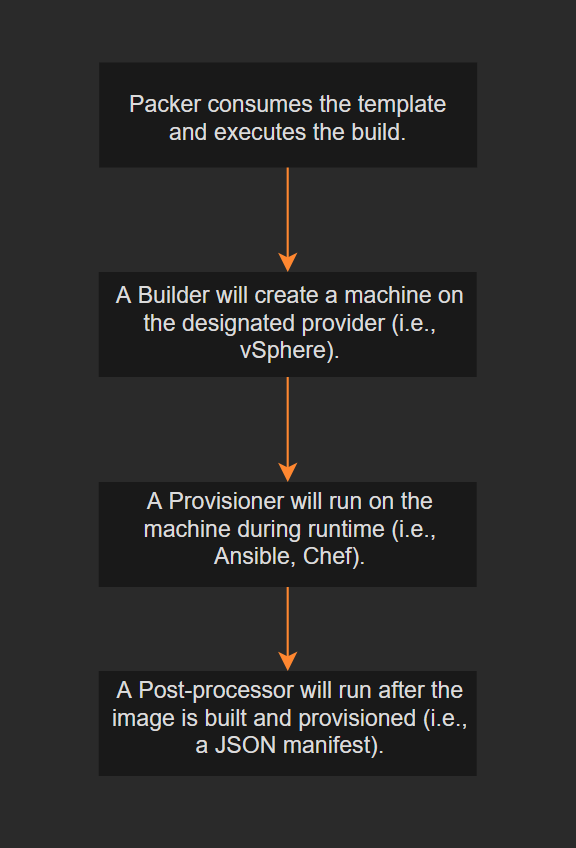
packer build reads the template, initializes the builder plugin, creates the machine,
runs provisioners, executes post-processors, and outputs artifacts.
Always run packer validate . before packer build . to catch syntax errors without
spinning up resources. Use packer fmt . to auto-format your HCL files.
Example Template (vSphere)
Full template source: packer-vsphere-cloud-init
Header
Pin the Packer version and declare required plugins:
packer {
  required_version = ">=1.7.4"
  required_plugins {
    vsphere = {
      version = ">=v1.0.1"
      source  = "github.com/hashicorp/vsphere"
    }
  }
}
Locals
Computed values available throughout the template:
locals {
  buildtime = formatdate("YYYY-MM-DD hh:mm ZZZ", timestamp())
}
Source
Defines the builder configuration. This tells Packer how to connect to vCenter and what VM specs to create. Truncated for readability:
source "vsphere-iso" "linux-ubuntu-server" {

  // vCenter credentials
  vcenter_server      = var.vsphere_endpoint
  username            = var.vsphere_username
  password            = var.vsphere_password
  insecure_connection = var.vsphere_insecure_connection

  // vSphere placement
  datacenter = var.vsphere_datacenter
  cluster    = var.vsphere_cluster
  datastore  = var.vsphere_datastore
  folder     = var.vsphere_folder

  // VM specs
  guest_os_type        = var.vm_guest_os_type
  vm_name              = "${var.vm_guest_os_family}-${var.vm_guest_os_vendor}-${var.vm_guest_os_member}-${var.vm_guest_os_version}"
  firmware             = var.vm_firmware
  CPUs                 = var.vm_cpu_sockets
  cpu_cores            = var.vm_cpu_cores
  RAM                  = var.vm_mem_size
  disk_controller_type = var.vm_disk_controller_type
Build
Ties together the source, provisioner, and post-processor:
build {
  sources = ["source.vsphere-iso.linux-ubuntu-server"]

  provisioner "shell" {
    execute_command = "echo '${var.build_password}' |  sudo -E -S sh -eux ''"
    environment_vars = [
      "BUILD_USERNAME=${var.build_username}",
      "BUILD_KEY=${var.build_key}",
    ]
    scripts = var.scripts
  }

  post-processor "manifest" {
    output     = "${path.cwd}/logs/${local.buildtime}-${var.vm_guest_os_family}-${var.vm_guest_os_vendor}-${var.vm_guest_os_member}.json"
    strip_path = false
  }
}
The shell provisioner runs scripts inside the VM during build. The manifest post-processor writes a JSON file with artifact details for downstream tooling.
“A secret in Git is no longer a secret. It’s evidence.” - Security team finding passwords in commit history
Never hardcode credentials in templates. Pass them via environment variables:
export PKR_VAR_vsphere_password="your-password"
packer build .
Packer auto-reads any PKR_VAR_<name> env var as a variable value. This keeps secrets out of
files and version control. For team environments, pair this with a secrets manager like Vault.
If a build fails mid-provisioning, use packer build -debug . to step through each stage
interactively. Packer pauses between steps and shows you the temporary SSH credentials so you
can connect and inspect the VM state.
Related
- Terraform and vSphere - Packer builds templates; Terraform deploys VMs from them
- Proxmox Automated Install - Answer-file automation for homelab hypervisors